How to manage AWS infrastructure with Terraform beyond provisioning
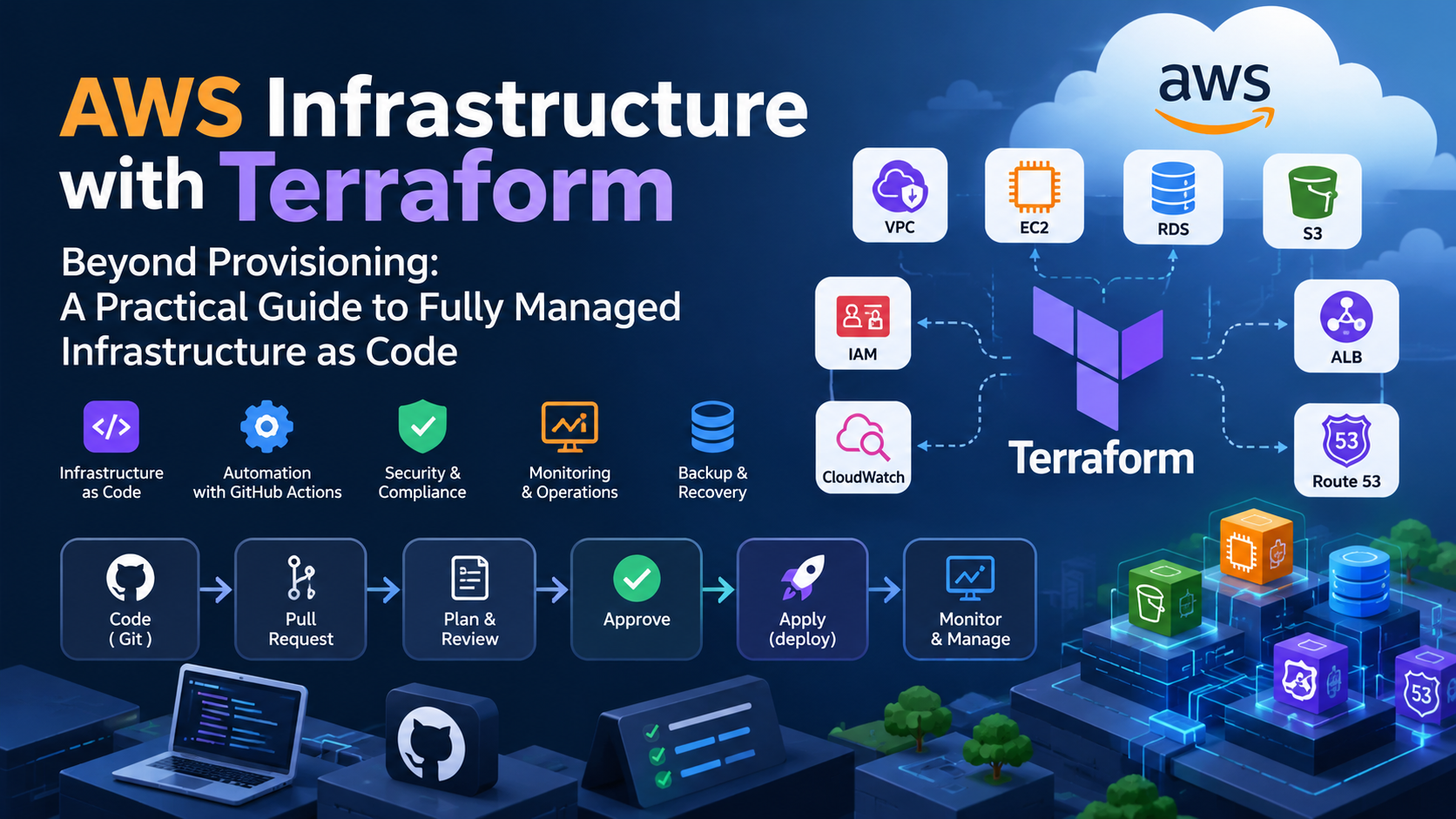
Introduction
ယနေ့ခေတ်လုပ်ငန်းခွင်တွေမှာ Infrastructure as Code (IaC) ကို အသုံးပြုခြင်းဟာ Infrastructure တွေကို မြန်မြန်ဆန်ဆန် တည်ဆောက်နိုင်ဖို့အတွက်သာ မဟုတ်တော့ပါဘူး။ Infrastructure တစ်ခုလုံးရဲ့ Lifecycle ကို ထိရောက်စွာ စီမံခန့်ခွဲနိုင်ဖို့လည်း အရေးကြီးလာပါတယ်။
Team အများစုမှာ Terraform ကို အသုံးပြုပြီး VPC, Subnet, Security Group, EC2, RDS, Load Balancer စတဲ့ AWS Resources တွေကို Provisioning လုပ်တဲ့အချိန်မှာပဲ အဓိက အသုံးပြုလေ့ရှိကြပါတယ်။
Infrastructure ကို တစ်ကြိမ်တည်ဆောက်ပြီးသွားတဲ့အခါ နေ့စဉ်လုပ်ငန်းဆောင်တာတွေကို AWS Console ကနေ ဆက်လက်စီမံခန့်ခွဲတာ၊ Resource တစ်ခုခု ပြောင်းလဲဖို့လိုလာတဲ့အခါ Console ကနေ တိုက်ရိုက်ပြင်ဆင်တာမျိုးတွေ ဖြစ်လာနိုင်ပါတယ်။
ဒီလိုလုပ်ဆောင်ခြင်းက အစပိုင်းမှာ လွယ်ကူပေမယ့် နောက်ပိုင်းမှာ Configuration Drift, Change Management, Security, Auditability နဲ့ Infrastructure Recovery စတဲ့ ပြဿနာတွေကို ဖြစ်ပေါ်စေနိုင်ပါတယ်။
ဒါကြောင့် Terraform ကို Provisioning အတွက်သာ အသုံးပြုမယ့်အစား Infrastructure ရဲ့ Lifecycle တစ်လျှောက်လုံးကို စနစ်တကျ စီမံခန့်ခွဲနိုင်တဲ့ Operating Model တစ်ခု အဖြစ် ပြောင်းလဲအသုံးပြုသင့်ပါတယ်။
1. Terraform ကို Provisioning Tool တစ်ခုအဖြစ်သာ မမြင်ပါနဲ့
Terraform ကို အသုံးပြုတဲ့အခါ အရေးကြီးဆုံးနားလည်ထားသင့်တဲ့ အယူအဆကတော့ Terraform ဟာ Infrastructure တည်ဆောက်ဖို့အတွက်သာမက Infrastructure ရဲ့ Desired State ကို သတ်မှတ်ပြီး စီမံခန့်ခွဲဖို့အတွက်ပါ အသုံးပြုတဲ့ Tool ဖြစ်တယ်ဆိုတာပါပဲ။
1. Git Repository
Terraform Code တွေကို Git Repository ထဲမှာ ထိန်းသိမ်းထားမယ်။ Infrastructure အပြောင်းအလဲတွေကို Pull Request နဲ့ Code Review လုပ်ပြီးမှ လက်ခံမယ်။
2. CI/CD Pipeline
GitHub Actions/ GitLab CI လို CI/CD Tool ကို အသုံးပြုပြီး Terraform Format, Validate, Security Scanning နဲ့ Plan တွေကို အလိုအလျောက် လုပ်ဆောင်မယ်။
3. Approval Process
Terraform Plan ထဲက Resource အသစ်ထည့်သွင်းမှု၊ Configuration ပြောင်းလဲမှု၊ Resource Replace လုပ်မယ့်အခြေအနေနဲ့ Resource ဖျက်သိမ်းမယ့်အခြေအနေတွေကို Review လုပ်မယ်။
4. Controlled Apply
အတည်ပြုပြီးတဲ့ Infrastructure Changes တွေကို CI/CD Pipeline ကနေတစ်ဆင့် AWS မှာ Apply လုပ်မယ်။
5. Continuous Management
Infrastructure Drift, Security Findings, Monitoring Alerts, Backup Status နဲ့ Cost တွေကို ပုံမှန်စစ်ဆေးပြီး Infrastructure ကို ဆက်လက်စီမံခန့်ခွဲမယ်။
ဒီ Workflow ရဲ့ ရည်ရွယ်ချက်က Infrastructure Changes တွေအတွက် ပုံမှန်လုပ်ငန်းစဉ်တစ်ခု တည်ဆောက်ဖို့ပါပဲ။
Change Code → Create Pull Request → Review Plan → Approve → Apply → Verify → Monitor
ဒီလိုလုပ်ဆောင်ခြင်းအားဖြင့် Infrastructure Changes တွေကို ပိုမိုစနစ်တကျ၊ လုံခြုံစိတ်ချစွာနဲ့ Audit လုပ်ရလွယ်ကူအောင် စီမံခန့်ခွဲနိုင်ပါတယ်။
2. Terraform နဲ့ ဘာတွေကို Manage လုပ်သင့်သလဲ။
Fully Managed IaC ဆိုတာ AWS Infrastructure တစ်ခုလုံးအပေါ် လုပ်ဆောင်မှုတိုင်းကို Terraform နဲ့ပဲ လုပ်ဆောင်ရမယ်လို့ ဆိုလိုတာ မဟုတ်ပါဘူး။
Terraform က Infrastructure Configuration ကို သတ်မှတ်ပေးပြီး AWS Native Services တွေက Infrastructure ရဲ့ Operational Activities အများစုကို ဆောင်ရွက်ပေးနိုင်ပါတယ်။
example -
| Responsibility | Recommended tool or approach |
|---|---|
| VPC, Subnet, Route Table, Security Group | Terraform |
| IAM Roles နဲ့ Policies | Terraform |
| ALB, WAF, ACM, Route 53 Configuration | Terraform |
| RDS Infrastructure Configuration | Terraform |
| Infrastructure Changes နဲ့ Approval | GitHub Actions + Terraform |
| Infrastructure Drift Detection | Scheduled Terraform Plan |
| API Activity Audit | AWS CloudTrail |
| Configuration Compliance | AWS Config |
| EC2 OS Patching | AWS Systems Manager |
| Infrastructure Monitoring | Amazon CloudWatch |
| Backup နဲ့ Recovery | AWS Backup နဲ့ Service-native Backup |
| Cost Monitoring | AWS Budgets နဲ့ Cost Management Tools |
ဒီနေရာမှာ မှတ်ထားသင့်တာက Terraform နဲ့ AWS Native Services တွေဟာ တစ်ခုနဲ့တစ်ခု အစားထိုးအသုံးပြုရမယ့်အရာတွေ မဟုတ်ပါဘူး။ တစ်ခုနဲ့တစ်ခု ဖြည့်ဆည်းပေးတဲ့ နည်းလမ်းတွေ ဖြစ်ပါတယ်။
ဥပမာ EC2 Instance တစ်ခုရဲ့ Operating System ကို Patch လုပ်ဖို့အတွက် Terraform ကို အသုံးပြုဖို့ မလိုအပ်ပါဘူး။ အဲဒီအစား AWS Systems Manager ကို အသုံးပြုပြီး Patch Scanning, Patch Installation နဲ့ Compliance Reporting တွေကို စီမံခန့်ခွဲနိုင်ပါတယ်။Terraform ကတော့ EC2 Instance ရဲ့ Infrastructure Configuration ကို စီမံခန့်ခွဲပေးနိုင်ပါတယ်။
3. Terraform Repository ကို စနစ်တကျ တည်ဆောက်ခြင်း
Small AWS Infrastructure အတွက် အစကတည်းက ရှုပ်ထွေးတဲ့ Platform Engineering Architecture တစ်ခု တည်ဆောက်ဖို့ မလိုအပ်ပါဘူး။
ရိုးရှင်းပြီး ထိန်းသိမ်းရလွယ်ကူတဲ့ Git Repository Structure တစ်ခုနဲ့ စတင်နိုင်ပါတယ်။
ဥပမာ -
aws-infrastructure/
├── .github/
│   └── workflows/
│       ├── terraform-plan.yml
│       ├── terraform-apply.yml
│       └── terraform-drift.yml
├── bootstrap/
│   └── terraform-state/
├── environments/
│   ├── uat/
│   │   ├── backend.tf
│   │   ├── providers.tf
│   │   ├── versions.tf
│   │   ├── main.tf
│   │   ├── variables.tf
│   │   └── terraform.tfvars
│   └── prod/
│       ├── backend.tf
│       ├── providers.tf
│       ├── versions.tf
│       ├── main.tf
│       ├── variables.tf
│       └── terraform.tfvars
└── modules/
    └── network/
ဒီ Structure မှာ Environment တစ်ခုချင်းစီအတွက် သီးခြား Terraform Root Configuration နဲ့ State ကို အသုံးပြုထားပါတယ်။
Reusable Modules တွေကိုလည်း တကယ်လိုအပ်လာတဲ့အချိန်မှာ စတင်အသုံးပြုနိုင်ပါတယ်။ ဥပမာ Environment အများအပြားမှာ တူညီတဲ့ Network Architecture ကို ပြန်လည်အသုံးပြုဖို့ လိုအပ်လာတဲ့အခါ Network Module တစ်ခု တည်ဆောက်နိုင်ပါတယ်။
အရေးကြီးတာက Structure ကို အလွန်ရှုပ်ထွေးအောင် မလုပ်ဖို့ပါပဲ။ Team Member တွေအနေနဲ့ Code ကို လွယ်လွယ်ကူကူ နားလည်နိုင်ပြီး ပြောင်းလဲမှုတွေကို ယုံကြည်စိတ်ချစွာ လုပ်ဆောင်နိုင်ဖို့ အရေးကြီးပါတယ်။
Remote State ကို အသုံးပြုပါ
Team တစ်ခုအနေနဲ့ Terraform ကို အသုံးပြုတဲ့အခါ State File ကို Developer တစ်ယောက်ချင်းစီရဲ့ Local Machine မှာပဲ သိမ်းဆည်းထားတာထက် Remote Backend ကို အသုံးပြုသင့်ပါတယ်။
AWS Environment အတွက် Amazon S3 Backend ကို အသုံးပြုနိုင်ပါတယ်။
Best Practices တွေအနေနဲ့ -
S3 Bucket Versioning ကို Enable လုပ်ထားပါ။
Data Encryption နဲ့ Public Access Block ကို Configure လုပ်ထားပါ။
Terraform Version က Support လုပ်တဲ့အခါ S3 Native State Locking အတွက်
use_lockfile = trueကို အသုံးပြုပါ။Production နဲ့ Non-production Environment တွေအတွက် သီးခြား State Key တွေ သတ်မှတ်ပါ။
State File ကို ဖတ်ရှုနိုင်တဲ့ IAM Permissions တွေကို ကန့်သတ်ထားပါ။
KMS Key နဲ့ Encryption Key Access ကိုလည်း သင့်လျော်စွာ ကန့်သတ်ထားပါ။
ဥပမာ Production Backend Configuration -
terraform {
  backend "s3" {
    bucket       = "company-terraform-state"
    key          = "application/prod/terraform.tfstate"
    region       = "ap-southeast-1"
    encrypt      = true
    use_lockfile = true
  }
}
ဒီဥပမာမှာ Terraform State File ကို S3 Bucket ထဲက application/prod/terraform.tfstate ဆိုတဲ့ Key နဲ့ သိမ်းဆည်းထားပါတယ်။
State Bucket ကို စတင်တည်ဆောက်ဖို့အတွက် အသုံးပြုမယ့် Bootstrap Configuration ကိုလည်း သီးခြားထားသင့်ပါတယ်။ ကိုယ်တိုင်သိမ်းဆည်းထားတဲ့ State ပေါ်ကို မှီခိုပြီး State Bucket ကို ဖန်တီးရတဲ့ Circular Dependency မဖြစ်စေဖို့ အရေးကြီးပါတယ်။
သတိပြုရန် - Terraform State File ထဲမှာ Sensitive Information တွေ ပါဝင်နိုင်ပါတယ်။ Variable တစ်ခုကို sensitive လို့ သတ်မှတ်ထားတာက Output မှာ ဖော်ပြခြင်းကို ကန့်သတ်ပေးနိုင်ပေမယ့် State ထဲမှာ မသိမ်းဆည်းတော့ဘူးလို့ မဆိုလိုပါဘူး။
4. GitHub Actions နဲ့ Infrastructure Changes တွေကို Automate လုပ်ခြင်း
Terraform ကို Provisioning အတွက်သာ အသုံးပြုနေရာကနေ Continuous Management Model တစ်ခုအဖြစ် ပြောင်းလဲဖို့ အရေးကြီးဆုံးအဆင့်တစ်ခုက CI/CD Pipeline တည်ဆောက်ခြင်း ဖြစ်ပါတယ်။
GitHub Actions ကို အသုံးပြုပြီး Pull Request ကနေ Infrastructure Deployment အထိ Workflow တစ်ခု တည်ဆောက်နိုင်ပါတယ်။
1. Pull Request ဖွင့်တဲ့အချိန်
Pull Request တစ်ခု ဖွင့်လိုက်တာနဲ့ အောက်ပါ Checks တွေကို အလိုအလျောက် လုပ်ဆောင်သင့်ပါတယ်။
terraform fmt -check
terraform init -input=false
terraform validate
terraform plan -input=false
ထို့အပြင် လိုအပ်သလို Linting နဲ့ Security Scanning တွေကိုပါ ထည့်သွင်းနိုင်ပါတယ်။
Terraform Plan ကို Code Reviewer တွေ ကြည့်ရှုနိုင်အောင် ထုတ်ပေးထားခြင်းအားဖြင့် Infrastructure ကို တကယ်မပြောင်းလဲခင် မည်သည့် Resource တွေ ထိခိုက်နိုင်မလဲဆိုတာ ကြိုတင်စစ်ဆေးနိုင်ပါတယ်။
2. Code Review နဲ့ Approval
Production Infrastructure အတွက် အထူးသဖြင့် အောက်ပါအချက်တွေကို ဂရုတစိုက် စစ်ဆေးသင့်ပါတယ်။
Resource အသစ်တွေ ထည့်သွင်းမလား။
ရှိပြီးသား Resource တွေကို ပြောင်းလဲမလား။
Resource တစ်ခုခုကို Replace လုပ်ရမလား။
Resource တစ်ခုခု ဖျက်သိမ်းသွားမလား။
Security Group, IAM Policy, Network Access စတဲ့ လုံခြုံရေးပိုင်းဆိုင်ရာ Configuration တွေ ပြောင်းလဲမလား။
Production Environment အတွက် Authorized Reviewer တစ်ဦးဦးရဲ့ Approval ကို မဖြစ်မနေ လိုအပ်အောင် သတ်မှတ်ထားနိုင်ပါတယ်။
3. Merge ပြီးနောက် Apply လုပ်ခြင်း
Approved ဖြစ်သွားတဲ့ Infrastructure Changes တွေကို CI/CD Pipeline ကနေတစ်ဆင့် Apply လုပ်သင့်ပါတယ်။
Production မှာ Arbitrary Pull Request တစ်ခုကို အလိုအလျောက် Apply လုပ်ခွင့်မပေးသင့်ပါဘူး။ Protected Branch, Required Review နဲ့ Protected Environment စတဲ့ Controls တွေကို အသုံးပြုသင့်ပါတယ်။
Plan File ကို သိမ်းဆည်းပြီး Apply မှာ ပြန်လည်အသုံးပြုမယ်ဆိုရင်လည်း အဲဒီ Plan ဟာ သက်ဆိုင်ရာ Code နဲ့ Terraform State အခြေအနေအတွက် မှန်ကန်နေသေးကြောင်း သေချာစေဖို့ လိုပါတယ်။ Saved Plan တွေထဲမှာ Sensitive Data ပါဝင်နိုင်တာကြောင့် Artifact Access နဲ့ Retention ကိုလည်း သင့်လျော်စွာ ကန့်သတ်ထားသင့်ပါတယ်။
AWS Authentication အတွက် OIDC ကို အသုံးပြုပါ
GitHub Actions က AWS ကို Access လုပ်ဖို့ Long-lived AWS Access Keys တွေကို Repository Secrets ထဲမှာ သိမ်းဆည်းထားတဲ့ ပုံစံထက် OpenID Connect (OIDC) နဲ့ IAM Role Assumption ကို အသုံးပြုတာ ပိုမိုသင့်လျော်ပါတယ်။
OIDC ကို အသုံးပြုတဲ့အခါ GitHub Actions က သတ်မှတ်ထားတဲ့ IAM Role ကို ယူပြီး AWS Resources တွေကို Access လုပ်နိုင်ပါတယ်။
ဒါပေမယ့် OIDC ကို Enable လုပ်ထားရုံနဲ့ လုံခြုံမှုအပြည့်အဝ ရရှိသွားတာ မဟုတ်ပါဘူး။ IAM Trust Policy ကို သတ်မှတ်ထားတဲ့ Repository, Branch သို့မဟုတ် Protected Environment နဲ့ ကိုက်ညီအောင် ကန့်သတ်ထားဖို့ လိုပါတယ်။ ထို့အပြင် IAM Permissions တွေကိုလည်း Least Privilege Principle အတိုင်း သတ်မှတ်ထားသင့်ပါတယ်။
5. The most important missing capability: Infrastructure Drift Detection
Terraform ကို Provisioning အတွက်သာ အသုံးပြုတဲ့ Team တွေမှာ မကြာခဏ တွေ့ရတတ်တဲ့ ပြဿနာတစ်ခုက Infrastructure Drift ဖြစ်ပါတယ်။
Infrastructure Drift ဆိုတာ Terraform Code ထဲမှာ သတ်မှတ်ထားတဲ့ Desired Configuration နဲ့ AWS မှာ အမှန်တကယ် ရှိနေတဲ့ Configuration တို့ မတူညီတော့တဲ့ အခြေအနေကို ဆိုလိုပါတယ်။
ဥပမာ -
Team Member တစ်ဦးက AWS Console ကနေ Security Group Rule တစ်ခုကို ပြောင်းလဲလိုက်တယ်လို့ ယူဆကြည့်ပါ။
AWS မှာတော့ Configuration အသစ်ကို အသုံးပြုနေပါပြီ။ ဒါပေမယ့် Terraform Code ထဲမှာတော့ အရင် Configuration အတိုင်းပဲ ရှိနေပါသေးတယ်။
Terraform နဲ့ AWS Infrastructure ကြားမှာ Drift ဖြစ်ပေါ်သွားတာပါ။
ဒီလိုအခြေအနေကို ပုံမှန်စစ်ဆေးမထားဘူးဆိုရင် နောက်တစ်ကြိမ် Terraform Apply လုပ်တဲ့အချိန်အထိ သတိမထားမိဘဲ ရှိနေနိုင်ပါတယ်။
Daily Terraform Plan ကို အသုံးပြုပါ
အစပိုင်းမှာ GitHub Actions ကို အသုံးပြုပြီး Environment တစ်ခုချင်းစီအတွက် Daily Terraform Plan Workflow တစ်ခု တည်ဆောက်ထားနိုင်ပါတယ်။
ဥပမာ -
terraform init -input=false

terraform plan \
  -input=false \
  -no-color \
  -detailed-exitcode
-detailed-exitcode ကို အသုံးပြုတဲ့အခါ Terraform က အောက်ပါ Exit Codes တွေကို ပြန်ပေးပါတယ်။
| Exit Code | Meaning | Action |
|---|---|---|
0 |
No changes proposed | Record a successful check |
1 |
Terraform encountered an error | Alert the team and investigate |
2 |
Changes are proposed | Review the plan and investigate the differences |
Exit Code 2 ဖြစ်တိုင်း Manual Change တစ်ခုကြောင့် Drift ဖြစ်နေတယ်လို့ ချက်ချင်း မဆုံးဖြတ်သင့်ပါဘူး။
တရားဝင်အတည်ပြုထားပြီး မ Apply ရသေးတဲ့ Code Change ရှိနေတာကြောင့်လည်း Plan ထဲမှာ Changes ပေါ်လာနိုင်ပါတယ်။
ဒါကြောင့် Scheduled Plan ထုတ်တဲ့အခါ Latest Approved Code ကို အသုံးပြုဖို့၊ Deployment Pending ဖြစ်နေတဲ့အခြေအနေတွေကို ထည့်သွင်းစဉ်းစားဖို့နဲ့ Plan Result တွေကို သင့်လျော်စွာ စီမံခန့်ခွဲဖို့ လိုပါတယ်။
Drift တွေ့ရှိတဲ့အခါ ဘယ်လိုဖြေရှင်းမလဲ။
ဥပမာ Security Group တစ်ခုကို Console ကနေ ပြောင်းလဲထားတာကို Terraform Plan က တွေ့ရှိတယ်ဆိုပါစို့။
Plan ထဲမှာ ဘယ် Configuration ကွာခြားနေသလဲဆိုတာ စစ်ဆေးပါ။
Manual Change ဟာ ခွင့်ပြုထားတဲ့ Change လား၊ မတော်တဆ ပြောင်းလဲမှုလားဆိုတာ ဆုံးဖြတ်ပါ။
Change အသစ်ကို လက်ခံဖို့ လိုအပ်ရင် Terraform Code ကို Pull Request ကနေ ပြင်ဆင်ပြီး Review လုပ်ပါ။
Change ဟာ မလိုအပ်တဲ့ Change ဖြစ်နေရင် Desired Configuration ကို ပြန်ရောက်အောင် Review လုပ်ထားတဲ့ Terraform Plan နဲ့ Apply လုပ်ပါ။
လိုအပ်ရင် AWS Console ကနေ တိုက်ရိုက်ပြောင်းလဲနိုင်တဲ့ Permissions တွေကို ပြန်လည်စစ်ဆေးပါ။
ဒီနေရာမှာ သတိထားရမယ့်အချက်က Drift တွေ့တိုင်း ချက်ချင်း terraform apply လုပ်ခြင်းဟာ အကောင်းဆုံး ဖြေရှင်းနည်း မဟုတ်ပါဘူး။
terraform apply -refresh-only ကလည်း AWS Infrastructure ကို Terraform Code နဲ့ ကိုက်ညီအောင် ပြောင်းလဲပေးတာ မဟုတ်ပါဘူး။ Real Infrastructure ရဲ့ လက်ရှိအခြေအနေကို Terraform State ထဲမှာ Update လုပ်ဖို့အတွက် အသုံးပြုတာ ဖြစ်ပါတယ်။
ဒါကြောင့် Drift ရဲ့ အကြောင်းရင်းကို နားလည်ပြီးမှ သင့်လျော်တဲ့ ဖြေရှင်းနည်းကို ရွေးချယ်သင့်ပါတယ်။
6. AWS Native Services တွေနဲ့ Operational Management ပြုလုပ်ခြင်း
Terraform က Infrastructure Configuration ကို စီမံခန့်ခွဲပေးနိုင်ပေမယ့် နေ့စဉ်လုပ်ငန်းဆောင်တာတွေကို စောင့်ကြည့်ဖို့အတွက် AWS Native Services တွေကိုလည်း ထည့်သွင်းအသုံးပြုသင့်ပါတယ်။
AWS CloudTrail - ဘယ်သူက ဘာကို ပြောင်းလဲခဲ့သလဲ။
AWS CloudTrail ကို အသုံးပြုခြင်းအားဖြင့် AWS Account အတွင်း API Activities တွေကို စစ်ဆေးနိုင်ပါတယ်။
ဥပမာ -
ဘယ်သူက Security Group ကို ပြောင်းလဲခဲ့သလဲ။
ဘယ်သူက IAM Policy ကို ပြင်ဆင်ခဲ့သလဲ။
AWS Console, CLI သို့မဟုတ် SDK ကနေ ဘယ် API Request တွေ လုပ်ဆောင်ခဲ့သလဲ။
ဒီအချက်အလက်တွေဟာ Security Investigation နဲ့ Change Audit တွေအတွက် အသုံးဝင်ပါတယ်။
ရေရှည် Audit လိုအပ်ချက်တွေ ရှိနေတယ်ဆိုရင် သင့်လျော်တဲ့ CloudTrail Trail နဲ့ Log Retention Policy တွေကို Configure လုပ်ထားသင့်ပါတယ်။
AWS Config - Configuration Compliance
AWS Config ကို အသုံးပြုပြီး သတ်မှတ်ထားတဲ့ AWS Resources တွေရဲ့ Configuration Changes နဲ့ Compliance ကို စစ်ဆေးနိုင်ပါတယ်။
ဥပမာ -
သတ်မှတ်ထားတဲ့ S3 Bucket တွေ Public Access ပေးထားသလား။
Security Group တွေက လက်ခံထားတဲ့ Security Baseline နဲ့ ကိုက်ညီသလား။
Resource တစ်ခုခုရဲ့ Configuration ဟာ Organization ရဲ့ Policy နဲ့ ကိုက်ညီသလား။
AWS Config ဟာ Terraform Drift Detection ကို အစားထိုးတာ မဟုတ်ပါဘူး။ Terraform က Desired Configuration နဲ့ Real Infrastructure ကြားက ကွာခြားချက်တွေကို စစ်ဆေးပေးနိုင်ပြီး AWS Config ကတော့ သတ်မှတ်ထားတဲ့ Configuration နဲ့ Compliance Rules တွေကို စစ်ဆေးပေးနိုင်ပါတယ်။
Config Recording နဲ့ Rule Evaluations တွေကြောင့် ကုန်ကျစရိတ် ဖြစ်ပေါ်နိုင်တာကြောင့် လိုအပ်တဲ့ Resource တွေနဲ့ Rules တွေကို ရွေးချယ်အသုံးပြုသင့်ပါတယ်။
AWS Systems Manager - Server Maintenance
EC2 Instances တွေကို အသုံးပြုနေတယ်ဆိုရင် AWS Systems Manager ကို အသုံးပြုပြီး Operating System Maintenance ကို စီမံခန့်ခွဲနိုင်ပါတယ်။
ဥပမာ -
Patch Scanning
Controlled Patch Installation
Maintenance Windows
Patch Compliance Reporting
အစပိုင်းမှာ Patch Scanning နဲ့ Compliance Reporting ကိုသာ စတင်အသုံးပြုပြီး လုပ်ငန်းလည်ပတ်မှုအပေါ် သက်ရောက်မှုကို နားလည်ပြီးမှ Automatic Patching ကို အဆင့်ဆင့် ထည့်သွင်းနိုင်ပါတယ်။
Amazon CloudWatch - Infrastructure Monitoring
Infrastructure တည်ဆောက်ထားရုံနဲ့ မလုံလောက်ပါဘူး။ Infrastructure ရဲ့ Health နဲ့ Performance ကိုလည်း စောင့်ကြည့်ဖို့ လိုပါတယ်။
Amazon CloudWatch ကို အသုံးပြုပြီး အောက်ပါ Metrics တွေအတွက် Alarms တွေ သတ်မှတ်နိုင်ပါတယ်။
EC2 Status Checks
EC2 CPU Utilization
Application Load Balancer Errors နဲ့ Latency
RDS Resource Utilization နဲ့ Database Performance
ထို့အပြင် လိုအပ်တဲ့ Logs တွေကို စုဆောင်းထားပြီး SNS သို့မဟုတ် Team ရဲ့ လက်ရှိ Notification Channel ကနေ Alert တွေ ပေးပို့နိုင်ပါတယ်။
AWS Backup - Backup နဲ့ Recovery
Backup ရှိနေတယ်ဆိုရုံနဲ့ Recovery လုပ်နိုင်မယ်လို့ မဆိုလိုပါဘူး။
အရေးကြီးတဲ့ Data နဲ့ Resources တွေအတွက် Backup Policy, Retention Period နဲ့ Recovery Procedure တွေကို သတ်မှတ်ထားသင့်ပါတယ်။
Terraform ကို အသုံးပြုပြီး သက်ဆိုင်ရာ Backup Configuration တွေကို စီမံခန့်ခွဲနိုင်သလို AWS Backup နဲ့ သက်ဆိုင်ရာ AWS Services တွေရဲ့ Native Backup Features တွေကိုလည်း အသုံးပြုနိုင်ပါတယ်။
Small Infrastructure တစ်ခုအတွက် အစကတည်းက AWS Governance Services အားလုံးကို Enable လုပ်ဖို့ မလိုအပ်ပါဘူး။
CloudTrail, အရေးကြီးတဲ့ CloudWatch Alarms နဲ့ Scheduled Terraform Plans တွေကို ဦးစွာ စတင်အသုံးပြုနိုင်ပါတယ်။ နောက်ပိုင်း Security Requirements နဲ့ Budget အပေါ်မူတည်ပြီး AWS Config အပါအဝင် အခြား Controls တွေကို တိုးချဲ့နိုင်ပါတယ်။
7. Infrastructure Management အတွက် ပုံမှန်လုပ်ဆောင်သင့်တဲ့ Schedule
Infrastructure ကို Continuous Management လုပ်နိုင်ဖို့ အတွက် အလွန်ရှုပ်ထွေးတဲ့ Operational Process မလိုအပ်ပါဘူး။ Team ရဲ့ Capacity နဲ့ Infrastructure ရဲ့ Criticality အပေါ်မူတည်ပြီး ရိုးရှင်းတဲ့ Schedule တစ်ခု သတ်မှတ်ထားနိုင်ပါတယ်။
Frequency | Activity | Expected outcome |
|---|---|---|
Every pull request | Validate, Security Scan, Terraform Plan | Unsafe or unexpected changes are caught before merging |
Every approved infrastructure change | Apply through CI/CD and verify | Controlled, auditable deployments |
Daily | Terraform drift check and review of critical alerts | Unexpected configuration changes are identified |
Weekly | Review failed deployments, backup status and security findings | Operational problems get assigned and resolved |
Monthly | Review access, patch compliance, costs, resource tags and recovery readiness | Infrastructure remains maintainable and cost-aware |
Quarterly | Test a recovery procedure and review the infrastructure design | Recoverability and operational documentation remain credible |
ဒီ Schedule ဟာ စတင်အသုံးပြုဖို့ အကြံပြုထားတဲ့ Model တစ်ခုသာ ဖြစ်ပါတယ်။ Production Criticality, Security Requirements နဲ့ Operational Risks တွေအပေါ်မူတည်ပြီး Frequency ကို ပြင်ဆင်နိုင်ပါတယ်။
8. A practical 30-day implementation plan
Terraform Management Model ကို တစ်ကြိမ်တည်း ပြောင်းလဲဖို့ မလိုအပ်ပါဘူး။ အောက်ပါအတိုင်း အဆင့်ဆင့် အကောင်အထည်ဖော်နိုင်ပါတယ်။
Week 1 - Foundation
Terraform Foundation ကို စနစ်တကျ တည်ဆောက်ပါ။
S3 Remote State နဲ့ State Locking Configure လုပ်ပါ။
State File Versioning ကို Enable လုပ်ပါ။
Environment တွေကို သီးခြားစီ စီမံခန့်ခွဲပါ။
Terraform Provider Version တွေကို ထိန်းချုပ်ပါ။
Resource Tagging နဲ့ AWS Access Permissions တွေကို ပြန်လည်စစ်ဆေးပါ။
Week 2 - Automation
GitHub Actions နဲ့ Infrastructure CI/CD Workflow ကို တည်ဆောက်ပါ။
Pull Request မှာ Terraform Validation နဲ့ Plan လုပ်ပါ။
Production Approval Process ကို သတ်မှတ်ပါ။
Approved Change တွေကို Pipeline ကနေ Apply လုပ်ပါ။
UAT Environment မှာ စမ်းသပ်ပြီးမှ Production ကို တိုးချဲ့ပါ။
Week 3 - Operations
Drift Detection နဲ့ Monitoring ကို ထည့်သွင်းပါ။
Scheduled Terraform Plan Workflow တည်ဆောက်ပါ။
Drift Findings အတွက် Notification ထည့်သွင်းပါ။
CloudTrail Activity တွေကို စစ်ဆေးနိုင်အောင် ပြင်ဆင်ပါ။
အရေးကြီးတဲ့ CloudWatch Alarms တွေကို Configure လုပ်ပါ။
လက်ရှိ AWS Config Setup ကို ပြန်လည်သုံးသပ်ပါ။
Week 4 - Resilience
Infrastructure Maintenance နဲ့ Recovery Process တွေကို စနစ်တကျ တည်ဆောက်ပါ။
Patching နဲ့ Backup Procedure တွေ သတ်မှတ်ပါ။
Alert Notification တွေ အမှန်တကယ် အလုပ်လုပ်နေကြောင်း စမ်းသပ်ပါ။
Recovery Test တစ်ခု လုပ်ဆောင်ပါ။
Emergency Change Procedure ကို မှတ်တမ်းတင်ပါ။
ရက် ၃၀ ပြည့်တဲ့အခါ Infrastructure ကို တည်ဆောက်နိုင်ရုံသာမက Changes တွေကို ထိန်းချုပ်နိုင်ခြင်း၊ Drift ကို ရှာဖွေနိုင်ခြင်းနဲ့ Recovery လုပ်ငန်းစဉ်တွေကို စမ်းသပ်ထားနိုင်ခြင်းတို့ကို ရည်မှန်းသင့်ပါတယ်။
9. How will you know the team has improved?
Terraform ကို အသုံးပြုတဲ့အခါ Infrastructure Provisioning အချိန် လျော့ကျသွားတာတစ်ခုတည်းကို Success Metric အဖြစ် မသတ်မှတ်သင့်ပါဘူး။
Infrastructure ကို ရေရှည်စီမံခန့်ခွဲနိုင်မှု ပိုမိုကောင်းမွန်လာသလားဆိုတာကိုလည်း တိုင်းတာသင့်ပါတယ်။
ဥပမာ အောက်ပါ Metrics တွေကို အသုံးပြုနိုင်ပါတယ်။
Approved CI/CD Pipeline ကနေ Apply လုပ်ထားတဲ့ Infrastructure Changes ရာခိုင်နှုန်း
မဖြေရှင်းရသေးတဲ့ Drift Findings အရေအတွက်
Terraform Deployment Failure အရေအတွက်
Drift တစ်ခုကို ရှာဖွေပြီး ဖြေရှင်းဖို့ ကြာချိန်
Backup နဲ့ Recovery Test ရလဒ်များ
AWS Security Findings တွေကို ဖြေရှင်းနိုင်တဲ့ အခြေအနေ
လစဉ် AWS Cost နဲ့ Budget ကြားက ကွာခြားချက်
ဒီ Metrics တွေကို အသုံးပြုခြင်းအားဖြင့် Terraform က Infrastructure ကို တည်ဆောက်ဖို့အတွက်သာ ကူညီပေးနေတာလား၊ ဒါမှမဟုတ် Infrastructure ကို ပိုမိုလုံခြုံစိတ်ချစွာနဲ့ ထိရောက်စွာ စီမံခန့်ခွဲနိုင်ဖို့ပါ ကူညီပေးနေတာလားဆိုတာကို သိရှိနိုင်ပါတယ်။
Conclusion
Small AWS Infrastructure တစ်ခုအတွက် Terraform Management Model ကို စတင်တည်ဆောက်မယ်ဆိုရင် ရှုပ်ထွေးတဲ့ Platform တစ်ခုကို အစကတည်းက တည်ဆောက်ဖို့ မလိုအပ်ပါဘူး။
စတင်အသုံးပြုဖို့ အကြံပြုချင်တဲ့ Stack ကတော့ -
Terraform - Infrastructure Configuration Management
GitHub - Version Control နဲ့ Pull Request Review
GitHub Actions - Infrastructure CI/CD Automation
Amazon S3 - Remote Terraform State
AWS CloudTrail - API Activity Audit
Amazon CloudWatch - Monitoring နဲ့ Alerting
AWS Systems Manager - EC2 Maintenance
AWS Config - လိုအပ်သည့်အခါ Configuration Compliance
HCP Terraform ကိုလည်း နောက်ပိုင်းမှာ Centralized Runs, Policy Controls နဲ့ Built-in Health Assessments စတဲ့ Features တွေ လိုအပ်လာတဲ့အခါ စဉ်းစားနိုင်ပါတယ်။ ဒါပေမယ့် အစပိုင်းမှာ Core Operating Model ကို တည်ဆောက်ဖို့ HCP Terraform ကို မဖြစ်မနေ အသုံးပြုဖို့ မလိုအပ်ပါဘူး။
အရေးကြီးဆုံးက Infrastructure ကို ဘယ်သူမဆို AWS Console ကနေ လိုသလို ပြောင်းလဲနိုင်တဲ့ ပုံစံကနေ အတည်ပြုထားတဲ့ Code နဲ့ Controlled Workflow ကနေတစ်ဆင့် စီမံခန့်ခွဲတဲ့ ပုံစံကို ပြောင်းလဲဖို့ ဖြစ်ပါတယ်။
ဒီ Workflow တစ်ခု အောင်မြင်စွာ အလုပ်လုပ်လာတဲ့အခါ ကျန်ရှိတဲ့ Environment တွေကိုလည်း အလားတူ ပုံစံနဲ့ တိုးချဲ့အသုံးပြုနိုင်ပါတယ်။
Terraform ရဲ့ တကယ့်တန်ဖိုးက Infrastructure ကို တည်ဆောက်ပေးနိုင်တာတင် မဟုတ်ပါဘူး။ Infrastructure ကို ဘယ်လိုတည်ဆောက်ထားသလဲ၊ ဘယ်လိုပြောင်းလဲခဲ့သလဲ၊ ဘယ်လိုစစ်ဆေးသလဲနဲ့ ပြဿနာဖြစ်လာတဲ့အခါ ဘယ်လိုပြန်လည်ထိန်းသိမ်းနိုင်သလဲဆိုတာတွေကို စနစ်တကျ စီမံခန့်ခွဲနိုင်စေတာပဲ ဖြစ်ပါတယ်။
References
About the author
- I have been working experience in areas of system administration, design, implementation & support of Windows Server Systems, Linux, Container and networking.
Comments
Join the discussionNo comments yet. Be the first to comment.