အားလုံးပဲ မင်္ဂလာပါ။ ဒီနေ့ ကျွန်တော် ပြောပြပေးသွားမဲ့ အကြောင်းအရာကတော့ ကျွန်တော်တို့ File Server တစ်ခု ဘယ်လို Setup လုပ်ရမလဲဆိုတဲ့ အကြောင်းပဲဖြစ်ပါတယ်။
ဆိုတော့ ကျွန်တော်တို့ NAS လဲ သုံးချင်တယ်။ Synology NAS တွေကျတော့လဲ စျေးကြီးတယ်။ ဒါဆို ဘယ်လိုလုပ်မလဲ??
Ubuntu As NAS
ကျွန်တော်တို့ သုံးနေတဲ့ Ubuntu ကိုပဲ Samba အသုံးပြုပြီး File Server တစ်ခုအနေနဲ့ Setup လုပ်သွားပါမယ်။
sudo apt update
sudo apt install samba
Check Installation success or not?
whereis samba
The Result may
samba: /usr/sbin/samba /usr/lib/samba /etc/samba /usr/share/samba /usr/share/man/man7/samba.7.gz /usr/share/man/man8/samba.8.gz
Samba ကို Install လုပ်ပြီးသွားပြီဆိုတော့ Share ဖို့အတွက် Directory တစ်ခု ဖန်တီးပါမယ်။
mkdir /home/<username>/sambashare/
ဒီ cmd က smabashare ဆိုတဲ့ Folder လေးကို Directory မှာ ဆောက်သွားတာပါ။
samba configuration file က ဒီလမ်းကြောင်းထဲမှာ ရှိတာပါ။ ( /etc/samba/smb.conf )
ကျွန်တော်တို့က ဒီ လမ်းကြောင်းထဲက File ကိုသွားပြီး configure ချပါမယ်။
sudo nano /etc/samba/smb.conf
ဒီ Config လေး ထည့်ပါမယ်။
[sambashare]
    comment = SambaShare
    path = /home/username/sambashare
    read only = no
    browsable = yes
ပီးရင် Save လုပ်ပါမယ်။ save လုပ်ပြီးရင် effect ဖြစ်ဖို့အတွက် service restart ချပေးရပါမယ်။
sudo service smbd restart
နောက်ပြီး Firewall မှာ smb traffic တွေအတွက် Rule update လုပ်ပေးဖို့လိုပါတယ်။
sudo ufw allow samba
User Acc တစ်ခု Create လုပ်ပါမယ်။
sudo smbpasswd -a username
Ubuntu Share
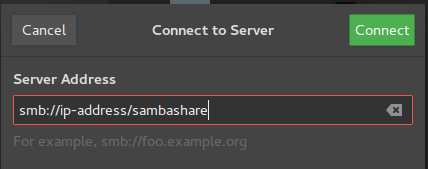
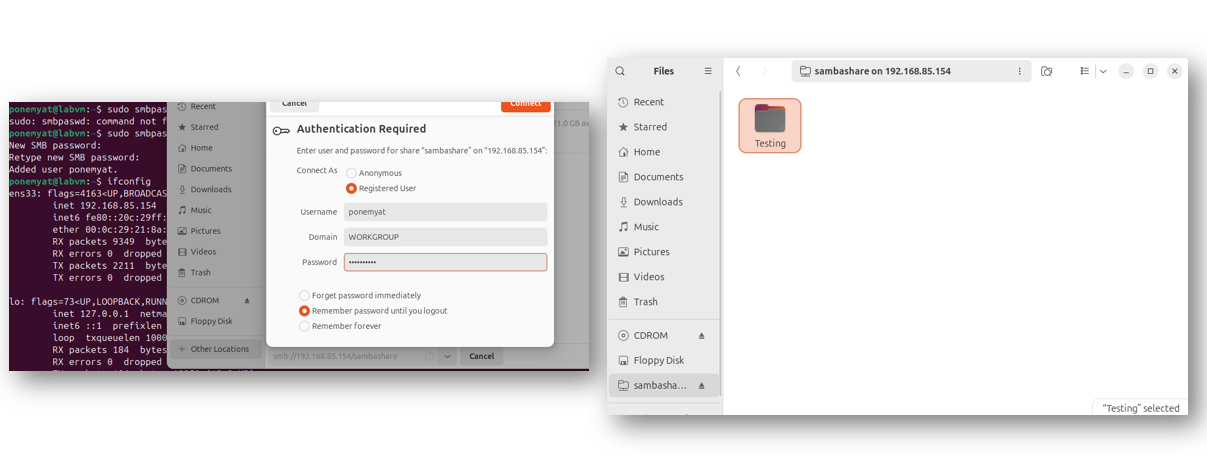
Mac Share
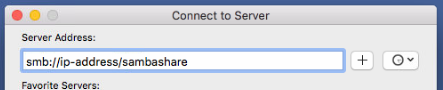
Windows
\\ip-address\sambashare
အခုဆိုရင်တော့ Ubuntu မှာ File Server Setup လုပ်နည်းလေး သိသွားပြီဆိုတော့ ဒီ lab လေးကို ဒီမှာပဲ အဆုံးသတ်ချင်ပါတယ်။ ကိုယ်တိုင်လဲ စမ်းလုပ်ကြည့်လို့ရပါတယ်။ အားလုံးပဲ အချိန်ပေးပြီး ဖတ်ရှုပေးတဲ့အတွက်လဲ ကျေးဇူးတင်ပါတယ် ခင်ဗျ။
Author By PoneMyat
About the author
I have over 6 years of experience in IT industry related to Systems and Network. I have been managing data centers with a focus on both on-premise and cloud servers.